
Green TU Go with Reusepass
Sign up for ReusePass and unlock access to sustainable take- out options in the LBC and Malkin Sacks Commons.
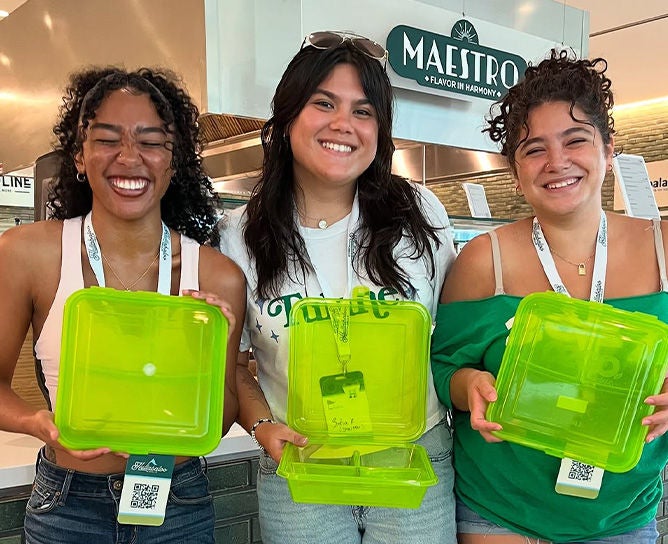
Signing Up for ReusePass
To begin, register for Reusepass by clicking the button the button below. You will need a valid phone number to complete the sign-up process. Once registered, your dashboard will show your program statistics, including any containers you currently have checked out.
ReusePass at the Malkin Sacks Commons
Whether you enjoy a quiet meal in your room or a picnic on a Tulane's beautiful campus, Reusepass offers a convenient way to enjoy a meal beyond the Malik Sacks Commons.
Step 1: Getting Your QR Code
On your ReusePass Dashboard, click 'Open Pass' to retrieve your personal QR code. This code can be accessed at any time on your ReusePass dashboard or saved to your phone wallet (Google Wallet or Apple Pay) for easy scanning.
Step 2: Get a Box
Swipe in at The Malkin-Sacks Commons and request a To-Go box from the cashier. Show your ReusePass QR code to check out a container. ReusePass Boxes can only be checked-out on the Feret/Library-side first floor entrance and on the second floor entrance of the Commons.
Step 3: Fill Up & Go
Once you've received your box, bring it to your favorite stations and hand it to the chef. They'll put your meal in the container and hand it right back to you. Once you have received your boxed meal, please exit the Commons. If you expect to eat inside the Commons and take a To-Go box, please use an additional meal swipe or pay the door rate a second time. Please note that you must wait 30 minutes between meal swipe uses.
Step 4: Return the Container
Rinse your containers and drop it in the appropriate ReusePass return bin. You can find the return bins for Commons To-GO containers the first-floor entrances within to the Malkin Sacks Commons.
Note: Please return Commons To-Go containers within 3 days of checking them out to avoid a $5 late fee .
ReusePass at the LBC Food Court
Our retail outlets at the LBC Food Court offer an easy way to take your meals with you with ReusePass.
Step 1: Link your Splash Card to GrubHub
To begin using your ReusePass account at the LBC, please download GrubHub and link your Splash Card to the app. Information on how to do that can be found here: https://tulane.mydininghub.com/en/locations/mobile-ordering
Note: ReusePass Boxes at the LBC are only available with the GrubHub mobile app. If you are ordering at the kiosk, and want to avoid a $2.50 Single-Use Container fee, select the Dine-In option to receive your meal on a plate or bowl for no additional charge.
Step 2: Get a Box
Once linked to vour GrubHub App, order your meal as normal from any ReusePass linked to your GrubHub App, order your meal as normal from any ReusePass-eligible location. When you reach the 'Container Type' drop-down, select 'To-Go - Reusable Container (Mobile). This will tell our staff to package your meal in the appropriate containers.
Step 3: Enjoy & Return the Container
Once ready, your meal will be given to you in your requested reusable container. Feel free to take it you and enjoy. When you are finished, please return the container marked return bins near the entrances at the LBC Food Court. the container you received at the clearly
Note: Please return your ReusePass containers within 3 days of checking them out to avoid a $5 late fee .
ReusePass Program Guidelines
- The ReusePass Program is available seven days a week during all hours of operation at the Malkin Sacks Commons and LBC Food Court during the academic year.
- Please do not microwave the To-Go containers. They use metal RFID chips to track check-ins and will
be damaged in a microwave. You may be charged a fee for any damaged containers. - ReusePass containers should not be brought into classrooms or academic spaces that disallow food
and beverages. - Please do not attempt to re-use a container you have checked out previously. Always return your
used container and receive a new one each time you use the program. - Commons To-Go - You can visit multiple stations with one box, but our chefs will not over-fill your
container. - Commons To-Go - To-go boxes must be able to fully close before leaving The Malkin Sacks
Commons. Containers that are overfilled or cannot be closed will not be accepted by our chefs. - Commons To-Go - Do not return containers to the standard dish return inside of the Malkin Sacks
Commons. Always use the labeled returns bins located near the entrances on the first floor of the Commons. - Commons To-Go - When you receive your food, please exit the Malkin Sacks Commons before enjoying your meal. This helps maintain a clear distinction between dine-in and takeout traffic.
- Commons To-Go- Dining in and taking a To-Go box on the same swipe or entry payment is not permitted. To do both, please use an additional meal swipe or pay the door rate a second time. Please note that you must wait 30 minutes between meal swipe uses.